
- dinner without phones sports, en
- Cameron
Get Live Sports Scores at Dinner in Minutes for ADHD Families

A Wi-Fi, screen-free scoreboard lets your family follow live games at dinner without anyone touching a phone. A screen-free sports scoreboard is one example: it connects to your home network, tracks the teams you pick, and shows instant score updates on its own display. The setup takes minutes, and the guidance below covers how to get it running reliably and how to fold it into your family’s routine.
TL;DR:
- A Wi-Fi, screen-free scoreboard displays only live scores and basic game status, supporting major sports leagues without additional notifications or streaming.
- Placing the device out of direct sight prevents it from becoming a distraction and helps maintain a focus on conversation during meals.
- Common setup issues involve weak Wi-Fi signals or band mismatches, which are resolved by switching to the 2.4 GHz band or optimizing network settings.
- For children with ADHD, using a passive scoreboard reduces mid-meal distraction, encourages family conversation, and supports sleep by limiting screen engagement.
- Maintaining consistent routines and involving family members in team selection can sustain engagement and reduce resistance over time.
Table of Contents
- What a Wi-Fi screen-free sports scoreboard is and how it works
- Why this helps families with dinner and with ADHD
- Quick setup checklist and common Wi-Fi fixes
- Placement, rules, and routines that make it stick
- Common troubleshooting and fixes
- Buying and placement guide: what to look for
- Sports and games that work for phone-free dinner nights
- Keeping everyone engaged once the novelty wears off
- When family members push back, and what helps
- What regular phone-free sports dinners do for a family over time
- A practical note on what changes at the table
- Get live scores at dinner without the phone
- FAQ
- Sources
What a Wi-Fi screen-free sports scoreboard is and how it works
A screen-free sports scoreboard is a small dedicated device that connects to your home Wi-Fi and pulls live score data for the teams you choose, then displays it on an always-on screen built only for that purpose. There is no feed to scroll, no app to open, and nothing to tap. It just sits there and updates.
A screen-free scoreboard works this way: you pick your teams across baseball, football, basketball, or hockey during setup, and the board refreshes scores automatically as games progress. A few things set this category apart from a phone or tablet:
- It shows one thing: the score and basic game status, nothing else competing for attention
- It supports team selection across major sports leagues, so you follow what you actually care about
- It has no streaming video, no notifications, and no social feed, so there is nothing designed to pull you in deeper
- It stays visible on a shelf, counter, or wall, so checking the score does not require picking anything up
That last point matters more than it sounds. A device you do not have to hold is a device that does not compete with the fork in your hand.
Why this helps families with dinner and with ADHD
The American Academy of Pediatrics recommends keeping mealtimes screen-free as part of a family media plan, noting that it supports stronger conversation and better sleep habits. That guidance was not written with sports fans in mind, but it applies directly: the problem was never watching a score update, it was the phone in hand that comes with it.
A review of studies found that excessive, unstructured screen time tends to worsen ADHD symptoms, while structured, low-engagement screen alternatives may be less harmful, according to a review of screen time and ADHD-related outcomes. That distinction between unstructured and structured use is the whole case for a passive scoreboard over a phone at the table.
For a child with ADHD, the benefits tend to show up in a few concrete ways:
- Less mid-meal distraction, since there is no feed to scroll past the score
- A visual anchor that answers “who’s winning?” without opening a negotiation about screen time
- More room for actual conversation, since nobody is staring down at a device
- A calmer wind-down to the evening, supporting the sleep benefits the AAP ties to screen-free meals
Quick setup checklist and common Wi-Fi fixes
Before you start, gather three things: your Wi-Fi network name and password, a phone or tablet on the same network for setup, and a power outlet near where the board will live. Most pairing issues come down to one of two things: a weak signal or a band mismatch.
Here is the short version of setup:
- Plug in the board and wait for its status light to turn solid
- Open the setup prompts on your phone and select your home Wi-Fi network
- Choose your teams across the supported sports
- Confirm the first score update appears, then move the board to its permanent spot
The most common snag is a band mismatch. Most smart home devices, including setup processes like this one, work best on the 2.4 GHz band, but many phones default to 5 GHz on a dual-band or mesh router. If setup stalls, temporarily switch your phone to your router’s 2.4 GHz network, or use a dedicated IoT network if your router offers one.
Pro Tip: If your router doesn’t show separate 2.4 GHz and 5 GHz networks by name, check your router’s app under “IoT” or “smart home” settings before assuming the board is broken.
Placement, rules, and routines that make it stick
Where you put the board shapes whether it fades into the background or becomes the new thing everyone stares at. A spot visible from the table but not directly in a sightline, like a nearby counter or shelf, works better than the center of the table itself.
A few rules keep the board a supporting player instead of the main event:
- Treat it like a wall clock: glance, don’t narrate every update
- Set one person per meal to call out a notable score change, rather than everyone checking at once
- Save deeper sports talk for a natural pause, not every time the number changes
- Let kids take a turn picking which team’s updates matter that night
Used this way, the board becomes a small shared ritual instead of a distraction, something closer to glancing at the weather than checking a notification.
Common troubleshooting and fixes
Most connectivity problems trace back to the same handful of causes, and most fix themselves in under five minutes.
- No light or display: check the power connection and outlet before anything else
- Stuck on setup: confirm your phone and the board are on the same Wi-Fi frequency band typically used by smart devices
- Frequent disconnects on mesh networks: mesh systems can drop IoT devices that only support 2.4 GHz, and fixes include a dedicated IoT network or disabling fast roaming temporarily
- Scores not updating: move the board closer to your router or nearest mesh node, since weak signal strength is a common culprit
Pro Tip: If the board loses connection repeatedly on the same mesh network, disable fast roaming in your router settings during setup, then re-enable it once the board is paired.
If none of that resolves it, note the board’s status light pattern and your router model before reaching out to support so the fix goes faster.
Buying and placement guide: what to look for
Look for a few things when choosing a device in this category. The display should be passive only, meaning it shows scores and nothing else, with no streaming or app layer riding along. It should support the leagues your family actually follows, whether that is baseball, football, basketball, or hockey. Setup should take minutes, not an afternoon, and the display should be readable from across a kitchen or dining room without squinting.
- Passive, single-purpose display with no video or social feed
- Team and league coverage that matches what your household watches
- Setup that does not require a dedicated app subscription
- Size and brightness suited to the room, whether wall-mounted or set on a counter
A device fitting this description supports team selection across baseball, football, basketball, and hockey, connects over Wi-Fi without a companion streaming app, and is built to sit in any room, including the kitchen counter during dinner.
Sports and games that work for phone-free dinner nights
Not every sport translates equally well to a glance-and-go format, and that is part of the point. Baseball and football both have natural lulls, innings and quarter breaks, that match the rhythm of a meal: check the score between bites, then go back to the conversation. Basketball and hockey move faster, which makes a passive scoreboard even more useful, since nobody has to pull out a phone mid-fast-break to see what happened.
Beyond the live score itself, a few simple games turn the scoreboard into something the whole table can join:
- Score prediction: everyone guesses the final score before the meal starts, loser clears the table
- Point spread guessing for older kids and adults, just for bragging rights, not stakes
- “Spot the lead change”: whoever notices a score flip first gets to share the update out loud
- Team trivia between innings or quarters, with younger kids answering easier questions about mascots or colors
These work across ages because they do not require anyone to track stats on a phone or look anything up. The scoreboard carries the only piece of information that matters in the moment, the live score, and everything else is conversation. A household that follows multiple sports can rotate which game gets the spotlight by night, which keeps the format from going stale during a long season.
Keeping everyone engaged once the novelty wears off
The first week with a new scoreboard is easy. Everyone checks it constantly because it is new. The real test is week six, when the games are mid-season and nobody is sure who’s actually invested anymore.
A few habits help sustain interest without forcing it:
- Rotate which family member picks the “game of the night” so nobody feels stuck following a sport they do not care about
- Tie small, low-stakes traditions to specific outcomes, like picking dessert if your team wins
- Let kids control their own team selection on the board rather than assigning it for them
- Bring back the prediction game periodically instead of every single night, so it stays a treat rather than a chore
For a child with ADHD specifically, consistency matters more than novelty. Keeping the scoreboard in the same spot, checking it at a similar point in the meal, and keeping the ritual short all help it become a reliable anchor rather than one more thing competing for attention. The goal is not maximum engagement with sports, it is a shared, low-pressure moment that happens to involve sports.
When family members push back, and what helps
Not every household member will be excited about a new device at the table on day one. A teenager might see it as one more rule. A partner might wonder why a gadget is necessary when “just agree to leave phones in the other room” sounds simpler on paper.
The honest answer is that agreements about phones rarely survive a close game or a text that cannot wait. A scoreboard removes the temptation rather than relying on willpower, which is a different and generally easier thing to maintain. A few ways to address pushback directly:
- Frame it as solving a real problem (missing the score, which leads to phone-checking) rather than as another restriction
- Let a skeptical family member pick the first team to track, so they have a stake in it working
- Keep the first week low-key: no new rules beyond “the board is there if you want to check”
- Acknowledge when the format does not fit every night, like during a playoff game everyone actually wants to watch together on a screen, and treat the board as the default for ordinary nights rather than an absolute rule
Most resistance fades once someone sees the practical upside: a score check that takes two seconds and does not turn into ten minutes of scrolling.
What regular phone-free sports dinners do for a family over time

A single phone-free dinner does not change much on its own. What changes things is the accumulation, months of meals where the default was conversation instead of screens, with a score update handled by a device that did not ask for any more attention than that.
The AAP’s guidance on family media plans ties screen-free meals to stronger communication over time, not just a better single evening. For a child with ADHD, a predictable, low-stimulation routine at the same time each day can become one of the more stable parts of their schedule, something to count on rather than something to negotiate.
Parents who keep this up tend to report a secondary effect beyond the dinner table itself: the habit of noticing a lull in conversation and filling it with a question instead of a phone starts to show up elsewhere too. None of that requires giving up on sports. It just means separating the score from the scroll, one dinner at a time.
A practical note on what changes at the table
Families tell us the biggest shift is not the score itself, it is what stops happening: fewer phones coming out “just to check,” fewer side conversations lost to a screen. For a child with ADHD, having the score answered by a glance instead of a device removes one more reason to reach for a phone. If you want a fuller picture, customer reviews on our site cover specific household setups in more detail.
— Cameron
Get live scores at dinner without the phone
A screen-free scoreboard solves this directly: pick your teams, connect it to your Wi-Fi, and set it somewhere visible, and dinner stays about the people at the table instead of the device in someone’s hand.
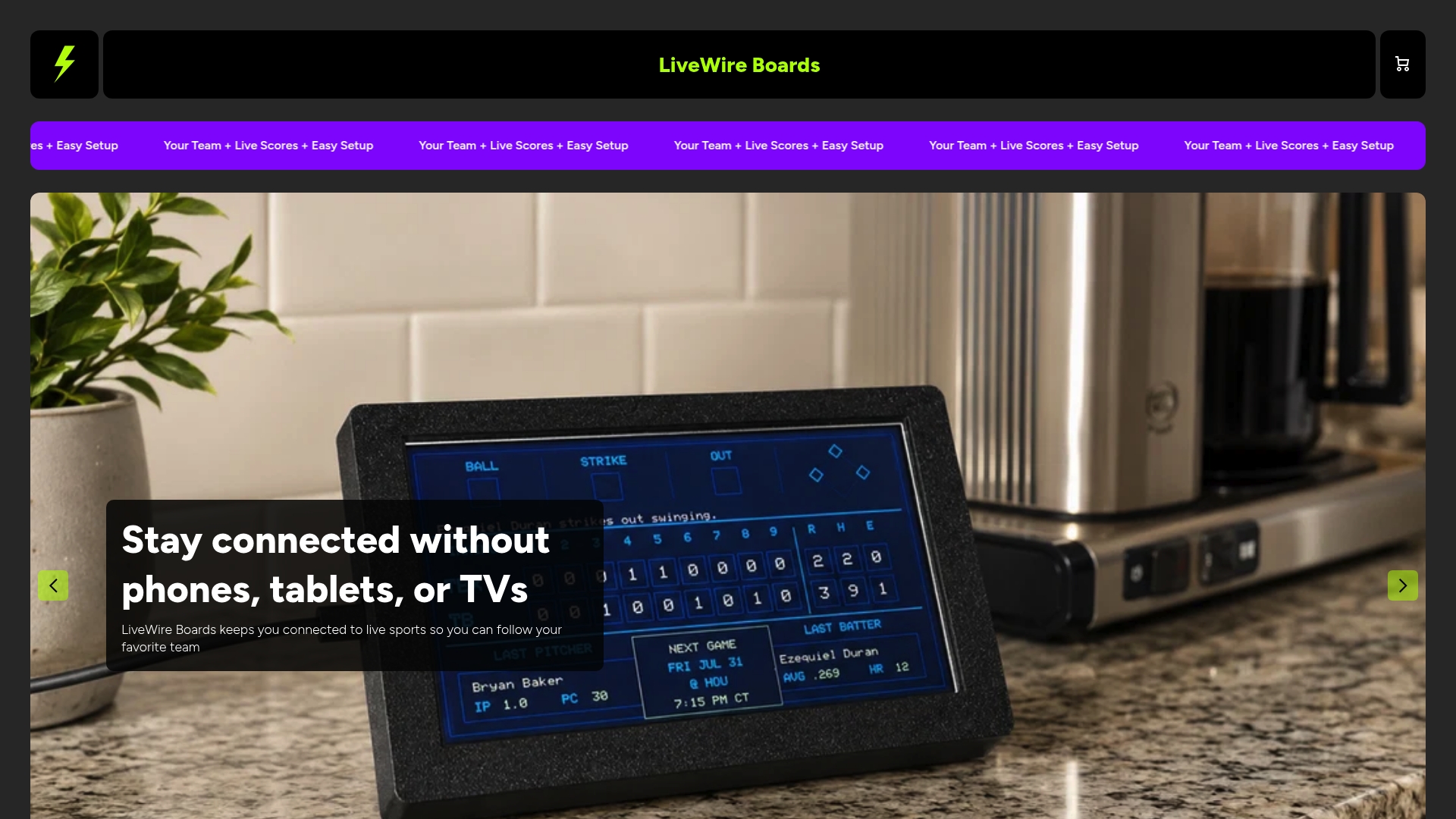
No app subscription, no streaming layer, just the score you came for. If phone-free dinners with live sports updates sound like what your house needs, check out The Original LiveWire Board and get it set up before tonight’s game.
FAQ
Does a screen-free scoreboard actually reduce distraction for kids with ADHD?
Passive, low-engagement displays are a lower-risk alternative to interactive screens for information needs, according to peer-reviewed research on digital media types and ADHD symptoms. A scoreboard that only shows a score, with no feed or notifications, does not carry the same pull that a phone does.
What’s the difference between 2.4 GHz and 5 GHz for setup?
Most smart home devices, including sports scoreboards, pair most reliably on the 2.4 GHz band rather than 5 GHz. If your phone defaults to 5 GHz during setup, switching it temporarily to 2.4 GHz usually resolves pairing failures.
Why does my scoreboard keep disconnecting on a mesh network?
Mesh Wi-Fi systems can drop devices that only support 2.4 GHz, and using a dedicated IoT network or disabling fast roaming during setup are the standard fixes. Re-enable fast roaming once the device has paired successfully.
Should bedroom TVs or screens be part of a screen-free routine too?
Having a TV in a child’s bedroom is linked to higher daily screen time and a higher chance of exceeding recommended limits, based on CDC data on bedroom TVs and screen time among youth with ADHD. Extending screen-free habits beyond dinner, including bedrooms, supports the same goals a phone-free meal does.
Is it better to set strict phone rules or use a device like this instead?
Rules alone depend on willpower holding up during a close game, which is often where they break down. A passive scoreboard removes the reason to reach for a phone in the first place, which tends to hold up better over time than a rule by itself.
Sources
- Healthychildren
- Review of screen time and ADHD-related outcomes (PubMed listing)
- Association of bedroom TVs with screen time among youth with ADD/ADHD - CDC data
- How Nest Wifi, Nest Wifi Pro, and Google Wifi 2.4, 5 GHz and 6 GHz bands work - Google Home and Nest Help
- Deco Smart Home Dropping? 3 Settings to Fix It | TP-Link


