
- en, stop checking scores
- Cameron
ADHD Families: Stop Checking Scores with a Screen Free Board in Minutes

Use a passive, Wi-Fi, screen-free scoreboard plus a short family media plan to stop compulsively checking live sports scores. This pairing cuts the alert-driven urge to grab a phone, replaces it with ambient awareness your whole family can glance at, and works especially well for households with ADHD. Start today: place a dedicated display in a central room and dock phones nearby.
TL;DR:
- Replacing active notifications with a passive scoreboard reduces compulsive score checking more effectively than simply muting alerts.
- Placing a Wi-Fi-connected board in a central room makes it easier for families to check scores collectively, avoiding the temptation of phone searches.
- A family media plan should set clear, simple rules like no phones during meals and scheduled viewing times, with gradual adoption for better compliance.
- Practicing the STOP method—Stop, Think, Observe, Plan—helps individuals pause and make conscious choices before checking their phone.
- The LiveWire Board provides instant, app-free updates for favorite teams, offering an accessible, screen-free alternative that minimizes distraction.
Table of Contents
- Why a passive display beats notification management
- How this approach helps neurodiverse families
- Setting up a Wi-Fi scoreboard for daily use
- Building a compact family media plan
- Practicing impulse control when the urge to check hits
- A parent’s honest take on breaking the habit
- How The Original LiveWire Board delivers a screen-free fix
- FAQ
- Sources
Why a passive display beats notification management
Turning off notifications sounds like the fix, but it usually is not enough. Checking becomes a habit of its own, separate from the alert that started it. Research comparing notification suppression to passive display use found that silencing alerts often fails to reduce total checking, because the behavior persists even after the original trigger disappears. The brain’s reward system keeps expecting variable outcomes, so the device itself, or just the memory of checking, keeps pulling at attention.
Two information models explain the difference:
- Active or interruptive: a buzz, banner, or badge that demands a reaction the moment it appears.
- Passive or ambient: information sitting quietly in view, available when you choose to look, invisible when you do not.
Studies on notification interruption find that replacing active alerts with ambient displays reduces compulsive checking more effectively than muting notifications alone. That is the entire case for moving scores off a phone and onto a surface that never pings.
How this approach helps neurodiverse families
Children with ADHD are especially sensitive to intermittent reinforcement, the same mechanism that keeps slot machines compelling. A score that might have changed, might not have, creates a loop of checking that is hard to interrupt once it starts. A passive scoreboard removes the “might have changed” tension because the update is always sitting there, visible without a tap or a search.
Adaptation tactics that help most families:
- Chunk viewing into short windows tied to natural breaks, like a quarter or inning ending.
- Frame the board socially: “Let’s check together” instead of a solo phone habit.
- Keep the update cadence predictable so there is less reason to double-check.
Guidance for neurodiverse children recommends gradual change paired with a tangible replacement, rather than a sudden ban, which can trigger resistance.
Pro Tip: Pair the scoreboard with a short, active ritual, like a “score minute” after each quarter, so kids get a moment of engagement without reopening a device.
Setting up a Wi-Fi scoreboard for daily use
Placement determines whether the board actually replaces phone-checking or just becomes another screen to ignore.
- Kitchen or living room: highest visibility, best for shared family glances during meals or downtime.
- Home office or playroom: useful where a child does homework, keeping scores visible without inviting a phone pickup.
- Near the charging station: reinforces the habit of docking phones instead of carrying them room to room.
Setup itself stays simple. Unbox the board, connect it to Wi-Fi, and select favorite teams across baseball, football, basketball, or hockey.
Daily routine recommendations:
- Dock phones in one spot each evening, including during games.
- Set a scheduled check window, such as right after dinner, instead of constant glancing.
- Let the board’s update become part of the family rhythm, like checking the weather on the way out the door.
Building a compact family media plan
The American Academy of Pediatrics recommends a family media use plan that sets screen-free zones, consistent times, and shared expectations. A short version works better than an exhaustive one.
Template basics:
- Zones: dinner table and bedrooms stay phone-free.
- Times: phones dock by 8 PM, score checks happen on the living room board instead.
- Expectations: everyone, including parents, follows the same rule.
Rolling it out in three steps:
- Hold a five-minute family meeting to introduce the plan, not a lecture.
- Start with one rule, like no-phone dinners, before adding more.
- Revisit after a week and adjust what did not stick.
Small, consistent steps outlast an all-at-once overhaul, especially for younger children or kids with ADHD who respond better to gradual change.
Practicing impulse control when the urge to check hits
Even with a scoreboard in place, the urge to grab a phone does not disappear overnight. CHADD’s guidance on digital habits recommends building a pause into the impulse, using a model like STOP: Stop, Think, Observe, Plan. Practice it as a short exercise: when the urge hits, pause for five seconds, ask what you are actually hoping to find, glance at the board instead, then decide if a phone is really necessary.
Other tactics that help:
- Delay-and-reward: wait ten minutes, then allow a check if the urge is still strong.
- Swap activities: replace the phone reach with a quick walk to the scoreboard or a question to another family member.
- Time checks around transitions, like after homework or before a meal, instead of mid-task.
Pro Tip: Praise the pause, not just the outcome. Noticing “you waited before checking” builds the habit faster than focusing on whether the score changed.
Parents modeling the same restraint matters more than any rule on paper, and it avoids turning this into a power struggle with older kids or teens who resist being told what to do.
A parent’s honest take on breaking the habit
The families who stick with this longest are not the ones who banned phones outright. They are the ones who gave everyone, including themselves, something better to glance at instead. A scoreboard sitting quietly in the kitchen does more to quiet a compulsive checking habit than another round of “put your phone away.” The goal was never to know less about the game, just to stop needing a screen to know it.
— Cameron
How The Original LiveWire Board delivers a screen-free fix
The Original LiveWire Board connects to home Wi-Fi and delivers instant score updates for chosen teams across baseball, football, basketball, or hockey, with no app and no additional screen. It is built for exactly the routine described above: a central, always-on display that replaces the phone glance instead of adding to it.
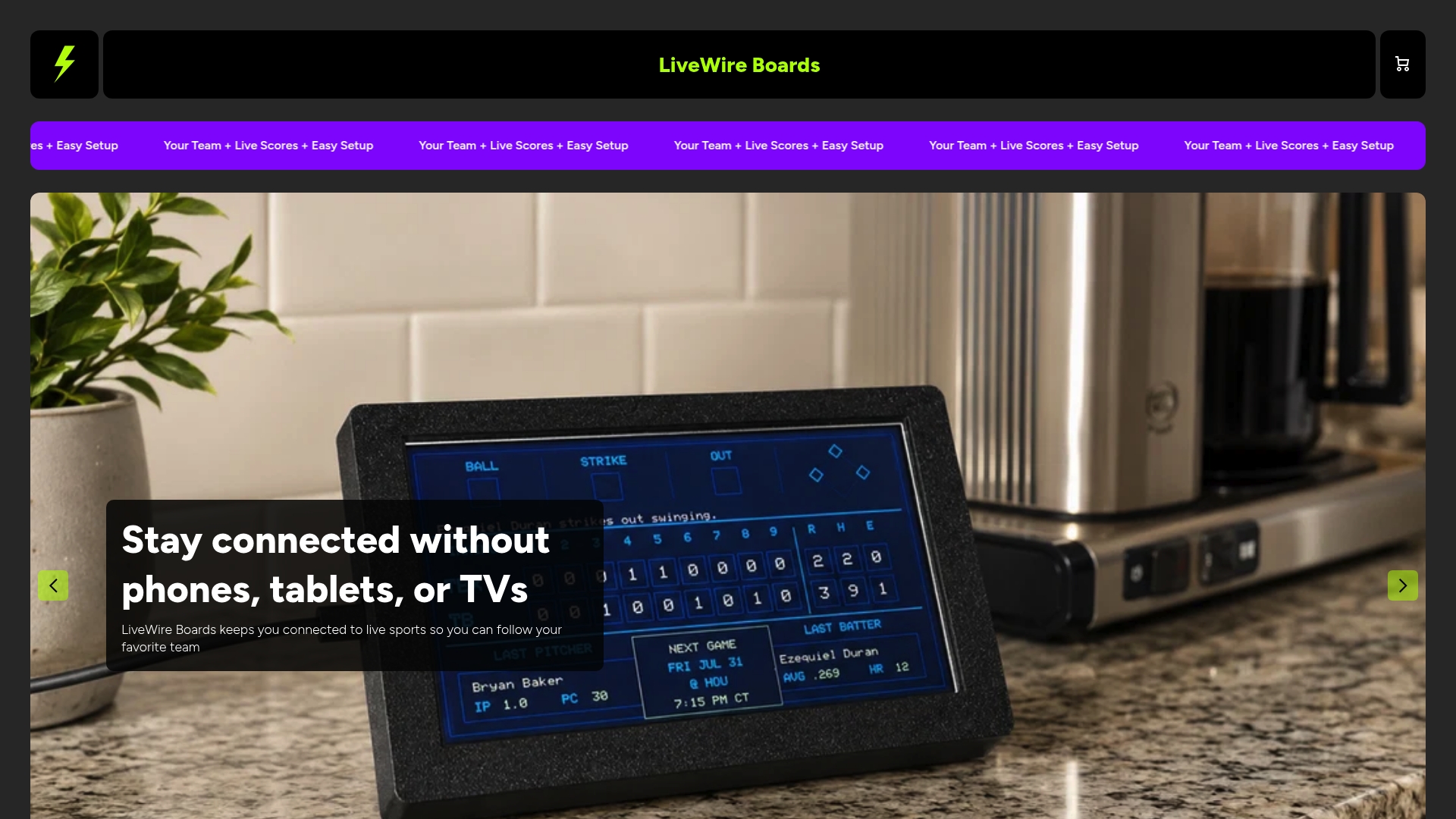
- Setup takes minutes: connect to Wi-Fi, pick your teams, done.
- Works in any room, from kitchen counters to home offices.
- Optional color case upgrades let the board match a living room or playroom.
Families aiming to cut screen time get a dedicated, on-task way to follow a game without opening the door to everything else a phone pulls in. Visit the product page to check availability and pick your teams.
FAQ
Why does turning off phone notifications not stop score checking?
Checking often becomes a habit separate from the original alert, so silencing notifications alone leaves the urge intact. Research on notification effects finds that replacing active alerts with ambient displays reduces compulsive checking more effectively than muting notifications alone.
How does a screen-free scoreboard help a child with ADHD?
A passive display removes the uncertainty that drives intermittent checking, since the score is always visible without searching. Guidance for neurodiverse children recommends gradual changes paired with a predictable, tangible replacement like a dedicated scoreboard.
What is the STOP model for managing the urge to check scores?
STOP stands for Stop, Think, Observe, Plan, a short pause practice recommended in CHADD’s guidance on healthier digital habits. It gives a few seconds of space between the impulse to check and the action itself.
What should go into a family media plan to reduce score checking?
A short plan with clear zones, times, and docking rules works better than a long list of restrictions. The American Academy of Pediatrics recommends screen-free zones like the dinner table and consistent device-free times shared by the whole family.
Does The Original LiveWire Board require an app to see scores?
No, it connects directly to home Wi-Fi and displays live updates for selected teams without an app or additional screen. Setup involves connecting to Wi-Fi and choosing favorite teams across baseball, football, basketball, or hockey.


