
Get Weeks, Not Hours: E Ink vs LED for Reading and Sleep

For long-form reading and minimizing eye strain, e-ink displays are the better choice. They reflect ambient light instead of emitting it, closely mimicking paper. LED and LCD screens win on color, video, and interactivity, but that same brightness and flicker is what tires your eyes and disrupts sleep. The right screen depends on what you’re actually doing with it.
TL;DR:
- E-ink screens reduce eye strain by reflecting ambient light and avoiding flicker, making them ideal for long reading sessions outdoors or in bright environments.
- LED and LCD screens emit direct light, often using PWM flicker and blue wavelengths, which can worsen eye fatigue and disturb sleep, especially after sunset.
- Devices with warm color temperatures, DC-dimming backlights, and lower brightness settings can significantly lessen eye discomfort on LED or LCD screens.
- E-ink devices last weeks on a single charge but are unsuitable for fast refresh tasks like video or scrolling, while LED displays excel in brightness, motion, and vivid colors.
- A hybrid approach, using one device for long readings and another for media and fast interactions, generally offers the best balance for different needs.
Table of Contents
- E Ink vs LED: How the Two Technologies Actually Work
- Reading Experience and Eye Strain: What the Research Shows
- Lighting Conditions, Glare, and Nighttime Reading
- Battery Life, Refresh Rates, and Performance Trade-offs
- Choosing between E Ink and LED for Your Reading Habits
- The Verdict: Picking the Right Screen and Fixing the One You’ve Got
- Why Calm, Low-Emission Displays Matter for Focused Households
- A Low-Distraction Way to Keep Up with the Score
- Sources
E Ink vs LED: How the Two Technologies Actually Work
The difference comes down to where the light comes from. E-ink screens use millions of tiny microcapsules filled with charged black and white particles that shift position when voltage is applied, forming letters and images using reflected ambient light, the same way ink sits on a printed page. There’s no backlight blasting through the display toward your eyes. Popular Science notes that this reflective approach is why e-readers feel closer to paper than to a phone.
LED and LCD screens work the opposite way. A backlight (or in OLED’s case, individual pixels) generates light that shines directly at your face, then filters through liquid crystals to create color and contrast. This is what makes video, animation, and rich color possible, but it also means every pixel is a tiny light source firing at your retina for hours at a stretch. Some of these backlights use pulse width modulation, or PWM, rapidly switching on and off to control brightness. Most people never notice it consciously, but sensitive users can pick up on the flicker as fatigue or headaches.
Reading Experience and Eye Strain: What the Research Shows
The science here is fairly consistent: sustained screen reading changes how your eyes behave—and not in a good way. Research published on NCBI/PMC shows that reading on LCD and tablet displays increases both objective and subjective measures of visual fatigue compared with e-ink devices, with e-ink readers producing smaller blink-rate changes and fewer complaints of eye tiredness. Blink rate matters more than most people realize. Every time you blink, you refresh the tear film across your eye. Staring at a bright, flickering source suppresses that reflex, which dries out the ocular surface and leads to the burning, gritty feeling most of us associate with “too much screen time.”
That feeling has a name. Cleveland Clinic classifies it as computer vision syndrome, or digital eye strain, a recognized condition tied to prolonged screen use.
Here’s what tends to drive the discomfort:
- Reduced blink rate during sustained close-up screen focus
- PWM flicker in cheaper or older LED backlights
- High contrast between a bright screen and a dark room
- Blue-heavy color temperatures that increase perceived glare
Reality check: the visual fatigue gap between e-ink and LCD isn’t marginal. Multiple measures, from blink rate to self-reported tiredness, consistently favor e-ink for extended reading sessions.
Not every LCD is equally hard on your eyes, though. Devices with DC-dimming backlights instead of PWM, warmer default color temperatures, and lower peak brightness can close much of that gap for daytime reading.
Pro Tip: If you’re stuck reading on a phone or tablet at night, drop the color temperature to its warmest setting and cut brightness until the screen barely outshines the room around you. It won’t match e-ink, but it meaningfully reduces the glare your eyes are fighting.
Lighting Conditions, Glare, and Nighttime Reading
Outdoors, e-ink wins without much argument. Because the display reflects ambient light rather than competing with it, sunlight actually makes an e-ink screen easier to read, the opposite of what happens with glossy LED and LCD panels, which wash out and force you to crank brightness just to see the text. E-ink devices use frontlights, small LEDs along the edge that illuminate the reflective surface, while phones and tablets use backlights shining directly through the pixels toward your eyes. That distinction matters most after dark.
Light-emitting screens, especially ones heavy on blue wavelengths, are linked to melatonin suppression and delayed sleep onset compared with non-emissive reading. Harvard Health has documented this effect in detail, and it’s a major reason sleep specialists recommend cutting screen use before bed.
A few practical fixes for nighttime reading:
- Use an e-reader’s warm frontlight mode instead of a phone or tablet after sunset
- Avoid high-brightness, cool-white LED screens in the hour before sleep
- Add ambient room lighting so your eyes aren’t adjusting between a dark room and a bright screen
Some newer front-lit e-readers with adjustable warm tones go further, producing substantially less retinal stress than cool-toned LCDs and reducing melatonin disruption compared with standard tablets.
Battery Life, Refresh Rates, and Performance Trade-offs
E-ink only draws power when the image on screen actually changes. Turn a page and it briefly refreshes; leave it displayed and it consumes almost nothing, which is why e-readers routinely run for weeks on a single charge instead of hours.
That efficiency comes at a cost: refresh speed. E-ink panels can’t redraw fast enough for smooth video or rapid scrolling, and quick navigation or annotation often produces visible ghosting, faint traces of the previous screen. Comparisons between e-ink and mini-LED tablets consistently point to lower contrast and slower refresh as the tradeoff for that battery advantage.
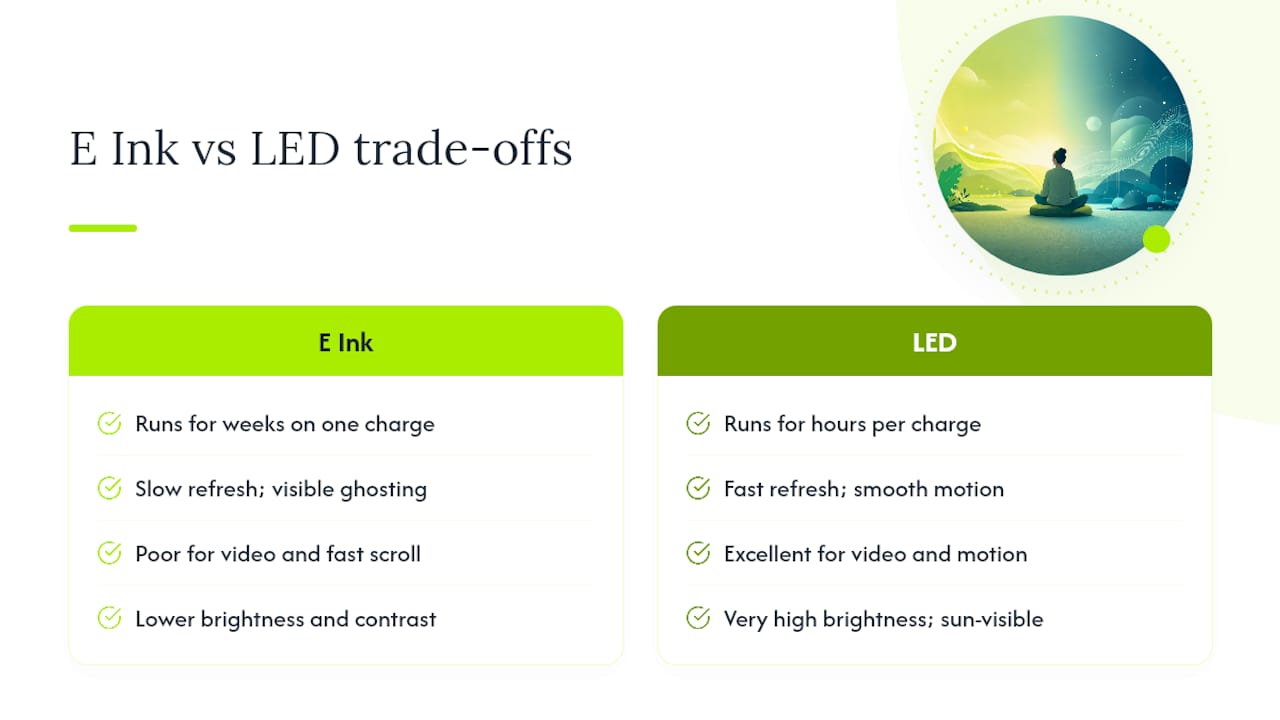
LED displays flip the equation entirely. They’re built for brightness and motion, with some LED panels reaching very high brightness levels, which is why they dominate outdoor signage, live video, and anything that needs to move fast and stay visible in direct sun.
Choosing between E Ink and LED for Your Reading Habits
Two questions settle most of this decision fast: what are you actually looking at, and where are you looking at it? Static text in bright rooms points toward e-ink; video, browsing, or dim environments point toward LED and LCD.
E-ink fits you best if you:
- Read books, articles, or documents for long stretches
- Read outdoors or in bright, sunlit rooms often
- Get eye fatigue or headaches from phone and tablet screens
- Want a device that lasts weeks, not hours, between charges
LED or LCD fits you best if you:
- Need color, video, or fast-moving graphics
- Navigate frequently between apps, tabs, or windows
- Work in dim rooms where screen brightness isn’t fighting sunlight
- Need touch responsiveness for drawing, editing, or gaming
Run through this six-question checklist before buying: What’s your lighting environment, mostly? What’s your primary content type, text or media? Do you need motion and video? Does portability and weight matter? What battery life do you actually expect? Do you read at night often?
Pro Tip: Plenty of readers keep both. An e-reader for books and long articles, a tablet or phone for everything else, swapping by task rather than trying to force one screen to do both jobs well.
The Verdict: Picking the Right Screen and Fixing the One You’ve Got
E-ink remains the stronger choice for anyone doing serious long-form reading, especially outdoors or before bed. LED and LCD earn their place for color, video, and fast interaction, tasks e-ink was never built for.
If you’re stuck on LED or LCD for now, three settings changes cut real strain:
- Warm up the color temperature, especially in the evening
- Use a display with DC dimming instead of PWM, or enable any available “flicker reduction” mode
- Lower brightness to match ambient room light rather than maxing it out
| Priority | E-ink | LED/LCD |
|---|---|---|
| Reading comfort | Best for extended sessions | Improves with warm tone, low brightness |
| Outdoor visibility | Excellent | Poor without high brightness |
| Night reading | Frontlight, low blue light | Higher melatonin disruption risk |
| Battery life | Weeks | Hours to a day |
| Motion and video | Not supported | Built for it |
A hybrid setup, one device for reading and another for everything else, usually beats trying to make a single screen do both jobs well.
— Cameron
Why Calm, Low-Emission Displays Matter for Focused Households
The same principle that makes e-ink easier on your eyes applies to how families manage screen time overall: less emitted light and less visual noise means less strain and fewer distractions. That’s the thinking behind screen-free display formats built for a single, calm purpose, showing information without competing for attention the way a backlit device does.
A Low-Distraction Way to Keep Up with the Score
Not every display problem needs a new screen or an eye-strain workaround. Sometimes the better fix is removing the screen from the equation entirely. The Original LiveWire Board takes the same logic behind e-ink’s calmer, glare-free reading experience and applies it to something families deal with constantly: watching the score without watching a phone.
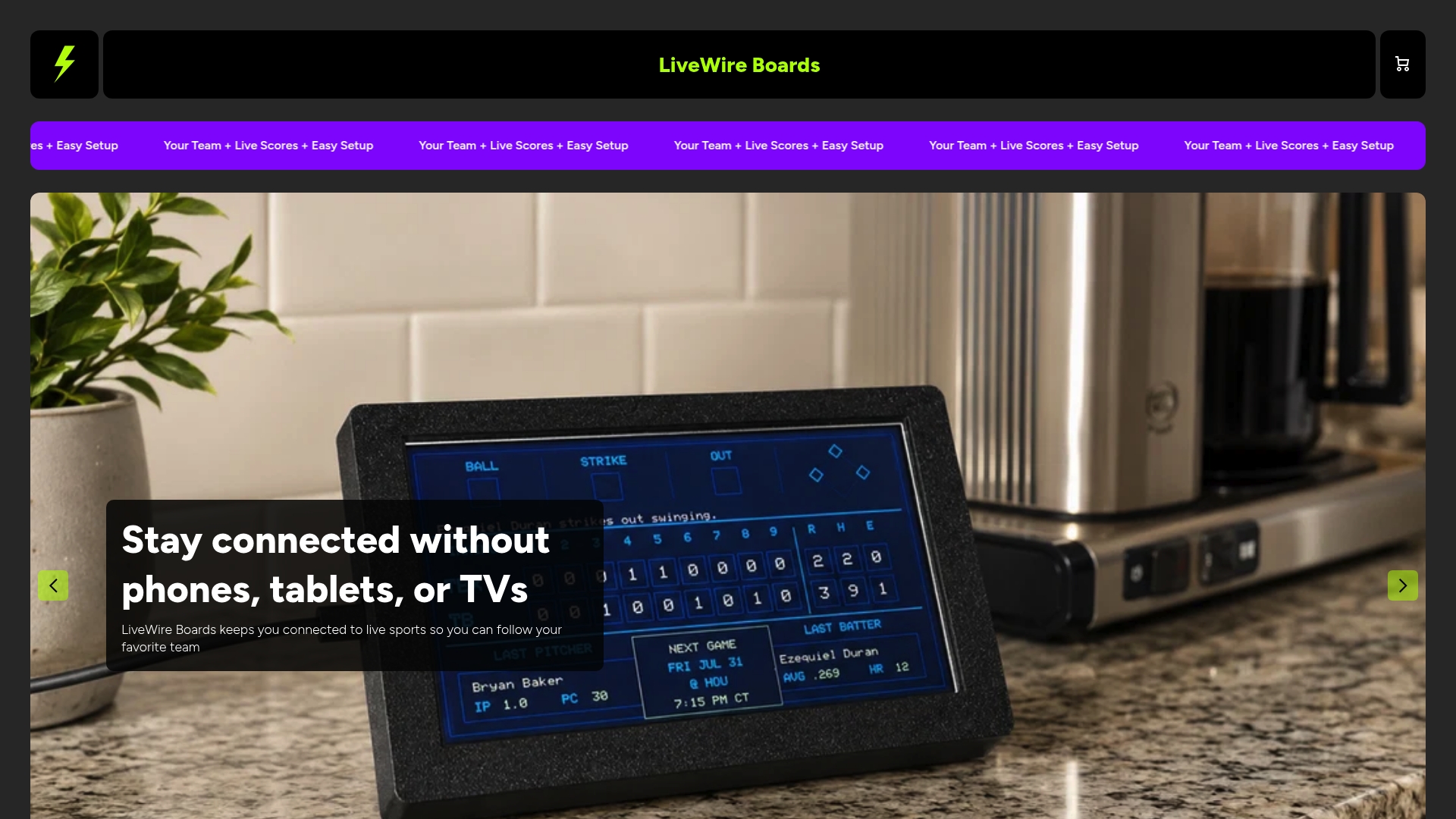
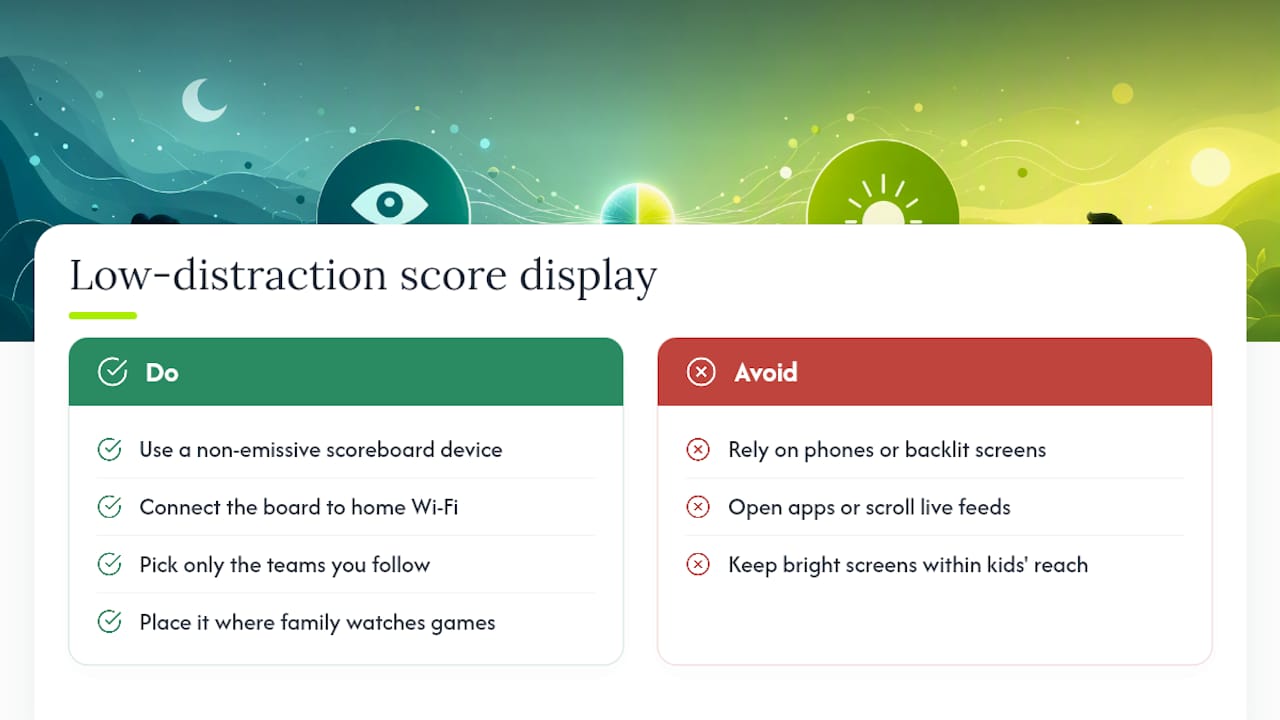
It connects to your Wi-Fi, lets you pick your teams across baseball, football, basketball, or hockey, and delivers live score updates without a backlight, an app, or a feed to scroll through. If you’ve read this far, you already know why fewer emissive screens in a household tend to mean less eye strain and fewer distractions, especially for kids who struggle to disengage once a bright screen is in front of them. This is that principle built into a physical object instead of a setting you have to remember to change.
If your goal is checking a score, not opening another screen, the Original LiveWire Board does that one job well. Browse the full lineup, including custom color upgrades, and get one set up in the room where your family actually watches the game.
This article is general information, not a substitute for advice from a qualified doctor. Consult a qualified healthcare professional about your own circumstances before acting on anything here.


