
- en, follow mlb without phone
- Cameron
Families: Follow MLB Without a Phone in 15 Minutes

The quickest way to follow MLB without a phone is a Wi-Fi, screen-free scoreboard that displays live scores for your chosen teams automatically. The Original LiveWire Board does this by pulling game data straight from the internet and showing it on a dedicated, low-distraction display. If a standalone board is not for you, other categories like email alerts, smart speakers, and TV tickers can fill the same need.
TL;DR:
- A Wi-Fi scoreboard for MLB updates refreshes within seconds, relying on a stable network connection and correct team setup, with minimal setup time.
- Position the device near a reliable outlet and Wi-Fi signal in a visible area to ensure consistent updates and avoid lag issues.
- Alternative options like email alerts, smart speakers, and TV tickers suit households with existing screens or specific routines, but lack the constant, glance-ready advantage.
- Troubleshooting common challenges involves checking power, Wi-Fi strength, team settings, and firmware updates, with placement near a dedicated outlet improving reliability.
- Radio broadcasts and walkie-talkies offer manual, non-screen options for detailed call-and-response updates when household screens are unavailable or impractical.
Table of Contents
- How a screen-free Wi-Fi scoreboard gets live MLB updates
- Setting up your scoreboard the right way the first time
- Screen-free alternatives if a dedicated board is not the fit
- Fixing lag and keeping updates reliable
- Using radio broadcasts and walkie-talkies for MLB game updates
- Why I stopped checking my phone during game nights
- Why The Original LiveWire Board solves this directly
- FAQ
- Sources
How a screen-free Wi-Fi scoreboard gets live MLB updates
A screen-free scoreboard works by connecting to your home Wi-Fi and pulling data from official sources rather than waiting on an app to refresh. MLB itself publishes live game feeds through public API endpoints that carry the game state, player information, and play-by-play events as they happen. A connected board checks that feed, grabs the relevant numbers, and renders them on its display, no phone or tablet required anywhere in the chain.
What shows up on the board typically includes:
- The current score for both teams
- Inning and number of outs
- Baserunner positions
- Current batter and the ball-strike count
Update frequency depends on the feed and your home network, but most boards refresh within seconds of a real play happening. Delays usually trace back to a weak Wi-Fi signal or a temporary outage on the data provider’s end rather than anything wrong with the board itself.
A review of early LiveBoard-style devices found that dedicated physical scoreboards deliver readable, real-time score updates while staying simple to set up and low on distraction. That is the core difference from a phone: there is no notification pinging, no app to open, and no temptation to scroll past the score into something else. The board just sits there and shows the game, which is exactly the point for households trying to keep screens out of the room.
Setting up your scoreboard the right way the first time
Getting a board running correctly takes about ten to fifteen minutes if you plan the location first. Most of the friction people run into comes from placement, not the device itself.
- Unbox the board and choose a wall or shelf that is visible from where your family actually sits.
- Confirm the spot has a nearby outlet and a strong Wi-Fi signal, since a weak connection is the most common cause of missed updates.
- Connect the board to your home network, avoiding guest networks or any Wi-Fi that uses a captive portal login screen, since those can block the steady connection the board needs.
- Select your favorite team or teams through the board’s setup process so it knows which games to track.
- Let the board cycle through its first update and confirm the score matches what you expect.
Pro Tip: Place the board on the same shelf every time, in the same room where the family already gathers, so it becomes the household’s default spot for checking scores instead of grabbing a phone.
Pick a location that doubles as a media-free zone anchor. Pediatric guidance from the American Academy of Pediatrics focuses less on rigid hour limits and more on the quality of media use, encouraging families to build a media plan around specific places and routines. A board in the kitchen or living room supports that kind of rule far better than a phone that can wander into a bedroom. Co-viewing the score together, even for a few seconds between innings, keeps the moment social instead of solitary.
Screen-free alternatives if a dedicated board is not the fit
A standalone scoreboard is not the only way to stay off your phone during a game. A few other categories work well depending on what your household already has.
- Email or text alerts send a short message when something happens, like a run scoring or the final score posting, which fits households that check a shared computer or printed inbox rather than a phone.
- Smart speakers can give a spoken score update on request, though they bring their own tradeoffs around always-listening microphones and the attention it takes to ask and wait for an answer.
- TV score tickers and cable overlays work well if the television is already on for another show, since the score scrolls by without requiring a separate device.
- DIY LED displays or small networked screens can be built by anyone comfortable with basic electronics, but they take more time to configure and maintain than a plug-and-play board.
Choose a dedicated board when you want a single, always-on display that needs no attention once it is set up. Lean toward one of the other categories when you already have a TV running most of the day or a household routine built around a shared computer instead.
Fixing lag and keeping updates reliable
Most problems with a screen-free scoreboard trace back to one of three things: power, Wi-Fi, or a team setting that got changed by accident.
- Check that the board is plugged in and powered on, since a loose cable is the most common reason for a blank display.
- Confirm your Wi-Fi signal is strong at the board’s location, and reboot your router if scores seem stuck.
- Double check the selected team in the settings menu, especially after a software update.
- Look for a firmware update if the board has been running the same version for a long stretch.
Lag usually comes from a weak signal between the board and your router or a brief outage on the data provider’s side, both of which tend to resolve within a few minutes. Placement near reliable Wi-Fi and a dedicated outlet solves most reliability complaints before they start, based on longstanding reviews of similar scoreboard devices that flagged connectivity and power placement as the biggest factors in day-to-day performance.
Pro Tip: Keep the board on its own outlet rather than a power strip that gets switched off at night, so it never has to reconnect to Wi-Fi from scratch the next morning.
For children with attention needs, a steady, non-blinking display placed at eye level tends to hold focus better than a flashing app notification ever could.
Using radio broadcasts and walkie-talkies for MLB game updates
Radio has followed baseball longer than any screen has, and it still works well for households avoiding phones. A local AM or FM broadcast gives full play-by-play commentary, which offers more detail than a scoreboard but demands more active listening. This suits a parent doing yard work or driving, where a glance at a display is not an option, but it is harder to use passively in a shared living room.
Walkie-talkies solve a narrower problem: relaying a score between two family members in different parts of a house or yard without anyone picking up a phone. One person near a radio or a board can give a quick update over the handset, keeping the information moving without introducing a screen into the exchange. This works especially well during yard work, cookouts, or when kids are playing outside and a parent wants to keep them looped in on the game.
Neither option replaces the at-a-glance convenience of a dedicated scoreboard, but both are useful backups when you are away from the display or want a more detailed call of the game than a scoreboard alone provides. Pairing a radio broadcast for detail with a board for the quick glance covers most situations a household runs into.

Why I stopped checking my phone during game nights

I used to check my phone every half inning just to see the score, and it never stayed at the score. One notification led to another, and the game became background noise to whatever else had pulled my attention. Replacing that habit with a dedicated board on the kitchen counter changed the rhythm of the evening. Nobody reaches for a device, and the score is just there when anyone glances over.
The bigger shift was how much easier it became to share the moment with my kids instead of narrating it from a lit-up screen. A board does not replace a family media plan, but it gives that plan something concrete to point to: a media-free zone that still keeps everyone in the game.
— Cameron
Why The Original LiveWire Board solves this directly
A live score board can give you a live score for your chosen MLB team without a single extra screen in the house. It connects to your Wi-Fi once during setup and then just works, no app to open and no notifications competing for attention.
- Wi-Fi connected display shows live score, inning, and game status for selected teams
- Setup takes minutes and requires no ongoing app management
- Passive, always-on display supports households reducing screen time
- Readable from across a room, so one glance tells you where the game stands
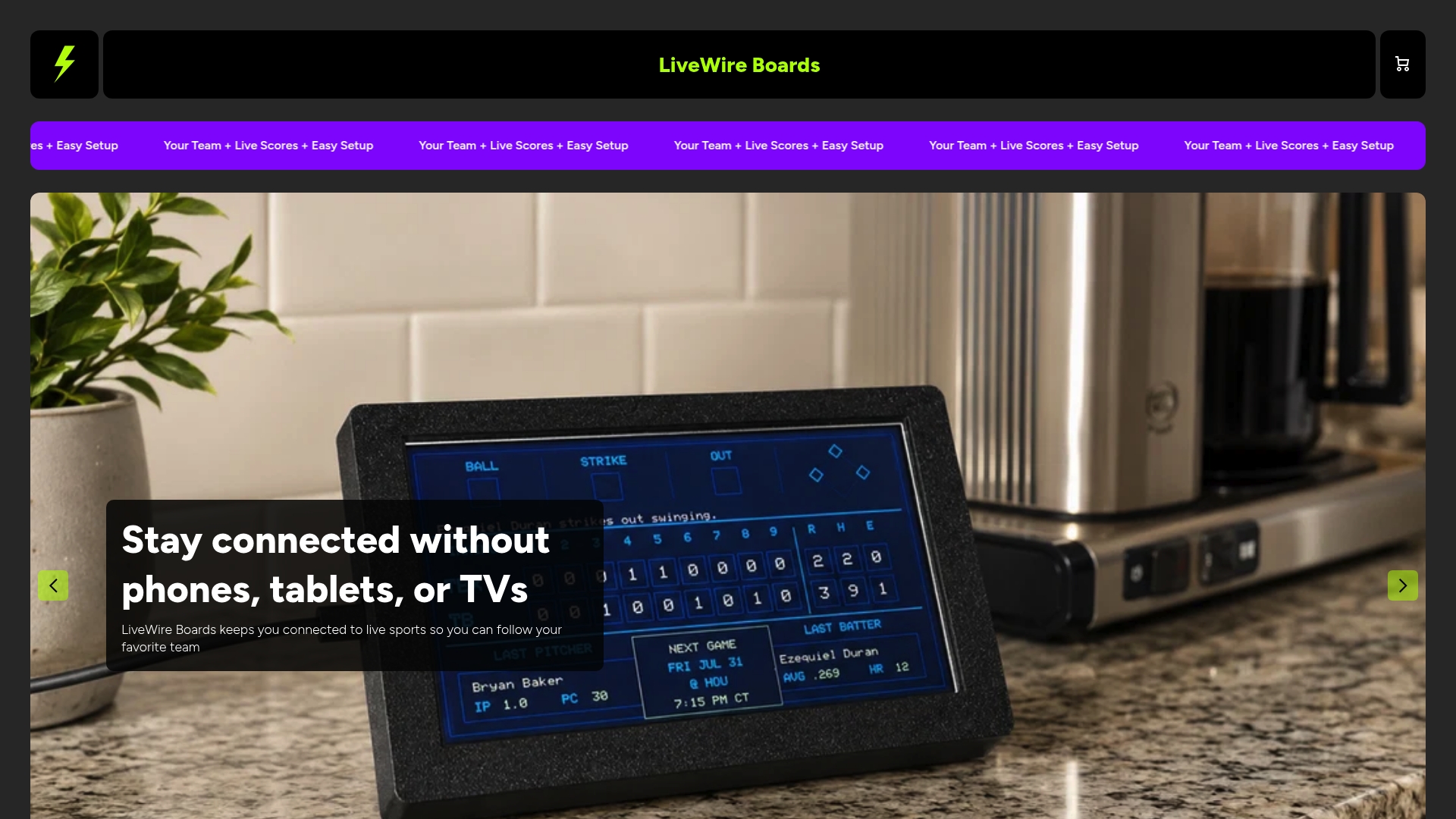
Most buyers plug the board in, connect it to Wi-Fi, select a team, and have a working display within fifteen minutes. From there it just needs a consistent spot near power and a signal. Visit the Original LiveWire Board product page to check current options and get one set up before the next series starts.
FAQ
Can I get live MLB scores without using a phone at all?
Yes. A Wi-Fi connected, screen-free scoreboard pulls data from MLB’s live game feeds and displays the score automatically, with no phone or app needed at any point.
How accurate are the scores on a screen-free scoreboard?
Scores come from the same underlying data MLB publishes on its official scores page, so a properly connected board should match what you would see there in near real time.
Does reducing screen time with a scoreboard actually align with pediatric guidance?
The American Academy of Pediatrics focuses on the quality of media use and recommends family media plans rather than strict hour counts. A passive, always-on display supports that kind of plan better than a phone that invites scrolling.
What if my scoreboard shows an outdated score?
Check your Wi-Fi signal first, since a weak connection at the board’s location is the most common cause, then confirm your team setting has not changed. A quick router reboot usually clears up any remaining lag.
Is a dedicated scoreboard better than a smart speaker for this?
A scoreboard gives a constant visual update with nothing to ask for, while a smart speaker requires a spoken request each time you want the score. Choose the board if you want a glance-and-go display, and a speaker if your household prefers voice over visuals.


