
- en, kitchen sports display
- Cameron
Evidence Backed Kitchen Sports Display for ADHD Families, No App Needed

A Wi‑Fi, screen‑free scoreboard is a smart fit for a kitchen if your goal is live score updates without another glowing screen competing for attention. A Wi-Fi connected scoreboard can track selected teams and post scores automatically. For families cutting back on screen time, or raising a kid with ADHD, that passive design means fewer phone checks and calmer meals.
TL;DR:
- A Wi-Fi scoreboard updates scores automatically without notifications, reducing phone checking and minimizing distractions during meals or family time.
- Setup requires connecting to Wi-Fi, selecting a few favorite teams, and placing the display where it’s easily visible from key areas in the kitchen.
- Placement should avoid heat sources, glare, or cluttered cords, ensuring the board remains readable and safe in a cooking environment.
- Priority features include real-time updates, support for multiple sports and teams, a durable, wipeable case, and a low-heat, sealed design suitable for kitchens.
- Maintenance involves occasional cleaning, firmware updates, and verifying Wi-Fi stability, with passive operation protecting user privacy by only needing Wi-Fi credentials and team preferences.
Table of Contents
- Why a Kitchen Sports Display Beats Checking Your Phone
- How Does a Wi‑Fi Sports Scoreboard Work?
- Where Should You Put a Sports Scoreboard in the Kitchen?
- What Features Actually Matter for a Kitchen Sports Display?
- Keeping It Running: Maintenance and Privacy Basics
- A Parent’s View of Living With a Kitchen Sports Display
- Product Spotlight: The Original LiveWire Board
- Sources
- FAQ
Why a Kitchen Sports Display Beats Checking Your Phone
Every phone buzz costs you more than a glance. Research using ERP brain scans found that push notifications during a task slow reaction times and increase errors, because your brain has to disengage, process the alert, then re-engage with what it was doing. Multiply that by every score update during a game and you get a kitchen full of people staring at screens instead of talking to each other.
A passive display sidesteps that loop entirely. It doesn’t ping, buzz, or demand a response. It just sits there and updates itself, so nobody has to unlock a phone to know the inning or the quarter. Clinical guidance on managing screen use in kids with ADHD backs this up directly: rather than banning devices outright, offering a credible, non-distracting alternative helps kids stay connected to their interests without the compulsive checking that phones invite.
What that looks like at home:
- Fewer “just checking the score” trips to the counter during dinner.
- Less temptation for kids to grab a tablet “just for a second.”
- Shared attention. Everyone sees the update at the same time, so it becomes a conversation instead of a solo scroll.
- Lower overall screen exposure without anyone feeling like something was taken away.
Digital wellbeing researchers describe this pattern well: devices that deliver information without requiring interaction let families stay informed while avoiding the addictive checking loop that apps are built to create. This type of device connects over Wi‑Fi, tracks chosen teams in baseball, football, basketball, or hockey, and pushes updates straight to the board. No app, no unlocking a screen, no scrolling past ads to find the score.
How Does a Wi‑Fi Sports Scoreboard Work?
Setup is closer to plugging in a smart speaker than programming a smart-home hub. Here’s the typical sequence:
- Connect to Wi‑Fi. Enter your home network credentials once during setup, similar to connecting a smart plug or a streaming stick.
- Select your teams. Choose which baseball, football, basketball, or hockey teams you want tracked. Most families pick two or three favorites.
- The board takes over. From that point on, it receives push updates automatically and displays live scores with no further input needed.
Before you start, check two things: your router’s range (the board needs a steady signal, so avoid basements or far corners away from the router) and outlet access near wherever you plan to place it. Most kitchens already have a counter outlet that works fine.
Initial setup typically takes a few minutes. Run through a short first-day checklist: confirm the firmware is current, verify the Wi‑Fi connection holds after a restart, and watch for one live update to confirm everything’s talking to each other correctly.
If something isn’t updating, the fix is usually simple. Reboot the board, re-enter your Wi‑Fi password if the network changed (a new router or password reset is the most common culprit), and check for a firmware update if scores seem delayed.
Pro Tip: Set up the board on the same Wi‑Fi band your other stable smart devices use. If your smart speaker or thermostat never drops connection, that’s the band your scoreboard wants too.
Where Should You Put a Sports Scoreboard in the Kitchen?
Visibility matters more than centrality. You want the board readable from where people actually stand and sit, not necessarily dead center on a wall.
- Place it where it’s visible from the prep area and the table or island, so nobody has to walk over to check.
- Keep it a few feet clear of the stove, oven, or anywhere splatter and steam are routine. Heat and grease are the enemies of any electronic device.
- Mount at eye level for a seated or standing view, whichever your kitchen layout favors. A wall hook, small stand, or adhesive mount all work depending on your counter and wall space.
- Manage cords along the baseboard or behind an appliance rather than draping them across a prep zone. This is a basic kitchen safety habit, not just a tidiness one.
- Avoid direct glare from overhead lighting or a window. A board that’s hard to read at a glance defeats the point of a low-effort display.
The best placement makes the board feel like part of the room instead of one more gadget competing for eyeballs. If you have to squint or angle your head to read it, move it before you get used to it.
What Features Actually Matter for a Kitchen Sports Display?
Not every scoreboard on the market is built for family use. Here’s what’s worth prioritizing:
- Update speed. Real-time push updates matter more than a device that refreshes every few minutes. A lag defeats the purpose of live scores.
- Team and league coverage. Confirm the board supports baseball, football, basketball, and hockey, and that switching between favorite teams is simple, not a multi-step process.
- Low interaction after setup. The best kitchen sports gadget for this use case is one you set once and forget. If it needs constant app syncing, it’s just a phone with extra steps.
- Durable, cleanable case. Kitchens are messy. A wipeable surface and a case built to handle counter life matter more than they sound. Color case upgrades can help the board match your kitchen decor rather than looking like a stray tech gadget.
- Sealed, low-heat-tolerant design. Anything sitting near a kitchen needs to handle ambient heat and the occasional splash without issue.
Keeping It Running: Maintenance and Privacy Basics
Upkeep is minimal by design. A few habits keep things running smoothly:
- Wipe the case occasionally with a damp cloth. Avoid harsh cleaners that could degrade the finish.
- Keep any vents or ports clear of dust and cooking residue.
- Install firmware updates when prompted. These are usually quick and infrequent.
- If updates stop coming through, check your Wi‑Fi connection first, then confirm your teams are still selected correctly.
- Before contacting support, jot down your model, current firmware version, and Wi‑Fi network type. It speeds up troubleshooting considerably.
On privacy, the setup asks for very little. Passive score displays generally only need your Wi‑Fi credentials and team selections, not an account tied to your personal browsing or location history the way most apps require.
A Parent’s View of Living With a Kitchen Sports Display
The first week, I kept expecting to reach for my phone during dinner to check a score. I didn’t need to. The board was already showing it. This shift means fewer phones come out at the table just to check scores.
The bigger change was quieter than I expected. Conversations during games didn’t get interrupted every few minutes by someone glancing down at a lit-up screen. My kids started asking to help pick which teams to track each season, which turned setup into a small family ritual instead of a chore. We do pause updates during homework hours, mostly out of habit, but during game nights, it just runs in the background exactly the way it should.
— Cameron
Product Spotlight: The Original LiveWire Board
If everything above sounds like what your kitchen needs, The Original LiveWire Board is built around exactly that checklist: Wi‑Fi connection, passive push updates, and simple team selection across baseball, football, basketball, and hockey.
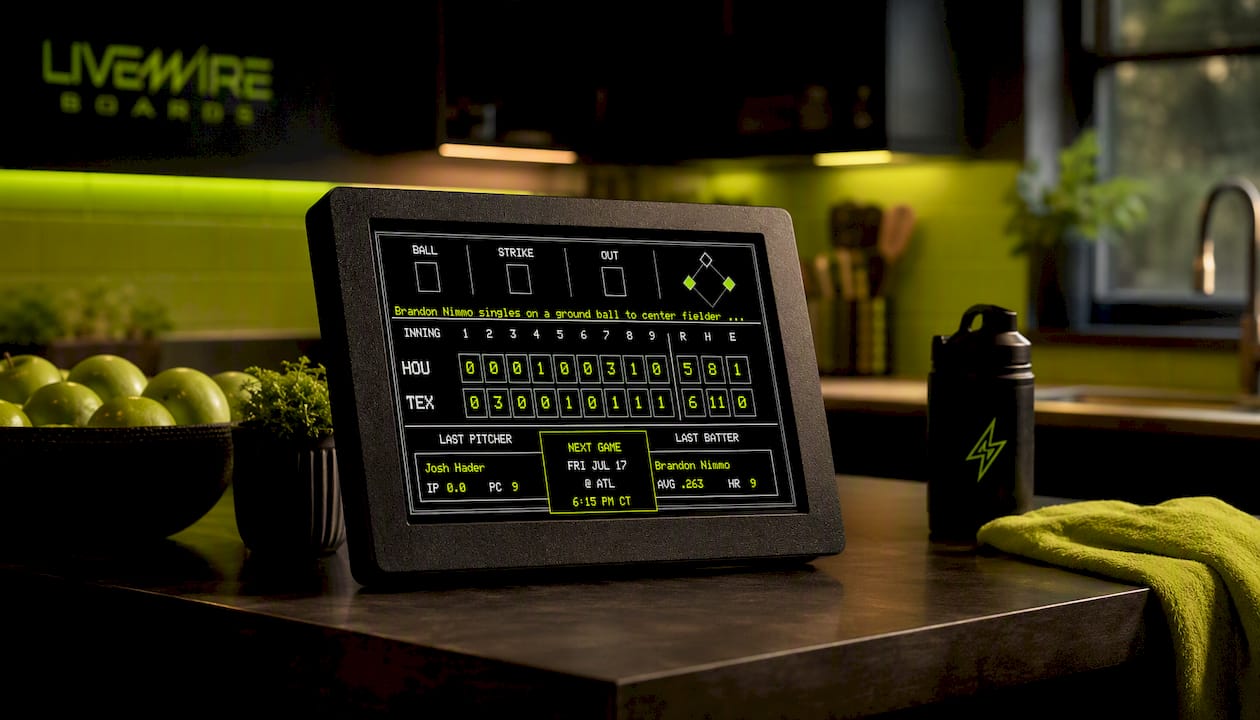
Setup takes minutes, not a manual. Once your teams are selected, the board runs on its own, no app-checking required, which is the entire point if your goal is fewer phone interruptions during family time. Optional color case upgrades let you match the board to your kitchen. Full specs, current pricing, and ordering details are available on the LiveWire Boards product page, along with support information if you have questions before you order. If you want a closer look at how passive displays stack up against full streaming setups, this comparison of dedicated streaming features is useful background, though it’s not the kind of always-on screen a kitchen scoreboard is meant to replace.
Pick your teams, plug it in, and see how quickly your kitchen stops feeling like it needs a phone check every ten minutes.
Sources
- The impact of electronic product use on children with tic disorders and ADHD, and management strategies: a review — Frontiers in Psychiatry
- An analysis of the effects of smartphone push notifications on task performance with regard to smartphone overuse using ERP — PMC
- Creating tech-free areas for children and families — OC Psychology Center
FAQ
What Is a Kitchen Sports Display?
It’s a Wi‑Fi connected, screen-free scoreboard that shows live score updates for selected teams in a shared space like a kitchen, without video, apps, or a traditional screen.
Does a Screen-Free Scoreboard Really Reduce Phone Checking?
Yes. Passive updates remove the need to unlock a phone for scores, and research on push notifications shows that phone-based alerts already disrupt focus, so removing that step cuts down on repeated checking.
Is This Type of Display Good for Kids With ADHD?
Clinical guidance recommends offering credible, non-distracting alternatives to phones, and a passive scoreboard fits that model by delivering the same sports interest without the checking compulsion apps create.
What Do I Need to Set Up The Original LiveWire Board?
You need a home Wi‑Fi network, a nearby outlet, and a few minutes to select your favorite baseball, football, basketball, or hockey teams during initial setup.
Where Should I Mount It in My Kitchen?
Place it at eye level within view of your prep area and table, a few feet from heat sources like the stove, with cords managed away from cooking zones.


