
- en, sports without notifications
- Cameron
Get Scores Without Notifications in 15 Minutes for ADHD Families

A Wi-Fi connected, screen-free scoreboard delivers live sports updates for your chosen teams without a single phone notification or app. A screen-free scoreboard is built for exactly this: instant scores in baseball, football, basketball, or hockey, visible in any room, with no screen time added to your household. This guide covers how the technology works, why it helps kids who struggle with focus, and how to set them up.
TL;DR:
- The scoreboards connect via Wi-Fi, refresh scores automatically, and have low power use, often lasting all day without intervention.
- Placing the scoreboard outside children’s bedrooms supports screen-free zones and aligns with pediatric guidance to reduce unstructured screen time.
- During high-traffic online periods, network congestion can slow updates, so prioritizing data packets and segregating networks improves performance.
- The boards support specific team and league coverage, with customization options for display readability, placement, and power sources affecting suitability.
- They gather minimal user data, primarily team selections and network credentials, with enhanced privacy and security when kept on separate, secure network segments.
Table of Contents
- How a screen-free scoreboard gets you live scores
- Why this matters for families and kids with ADHD
- Setting up your scoreboard at home
- What to look for before you buy
- Privacy and data in a screen-free setup
- Where screen-free scoreboards fall short
- The case for quiet sports fandom
- Keep your family connected to the game with The Original LiveWire Board
- FAQ
- Sources
How a screen-free scoreboard gets you live scores
A screen-free scoreboard works less like a tablet and more like a clock radio for sports. It skips apps, logins, and push alerts entirely, replacing them with a dedicated display that just shows the score.
Three parts make this possible:
- Display: often e-paper or low-glow LED, built for glanceability rather than video or graphics.
- Wi-Fi module: connects to your home network to pull updates without needing a phone nearby.
- Casing: durable housing designed to sit on a shelf or counter like a piece of furniture, not a gadget.
The update pipeline is simple. A sports data feed sends live scores to a cloud service, the board checks in over Wi-Fi at set intervals, and the display refreshes with the new number. No app has to be opened, no account has to be checked, and no phone has to light up. A Wi-Fi e-paper scoreboard project documented by a maker community shows this exact approach: a small web server controls the display, and the e-paper screen holds its image using almost no power between refreshes. That low-power design is part of why these boards can sit on all day without becoming one more battery to charge or screen to dim.
Pro Tip: Put the scoreboard on its own 2.4 GHz Wi-Fi network name and turn on router quality-of-service settings so video streaming elsewhere in the house doesn’t slow down your score updates.
Why this matters for families and kids with ADHD
The appeal here isn’t just convenience. It lines up with where pediatric guidance has been heading for years.
- The American Academy of Pediatrics recommends screen-free zones and times, including mealtimes, bedrooms, and the hour before bed, paired with parents modeling unplugged behavior themselves.
- The AAP’s newer Digital Ecosystems policy statement pushes for screen-free family time, one screen at a time, and filling that space with things like sports and art instead.
- A narrative review of ADHD and screen time found that excessive, unstructured screen exposure is consistently tied to worsening ADHD symptoms, and recommended structured screen reduction alongside behavioral and medical treatment.
That review searched 147 studies and examined 14 in depth, concluding that cutting unstructured screen time, alongside better sleep and physical activity, can support existing ADHD treatment plans. For a household built around a phone-based score check, that’s a meaningful shift: instead of unlocking a device and getting pulled into texts, feeds, or games, a dedicated scoreboard keeps the sports update isolated from everything else competing for attention. That separation reduces what researchers call technoference, the everyday interruptions phones create even when no one means to get distracted.
Setting up your scoreboard at home
Getting a board running is closer to setting up a smart speaker than configuring a computer. Most households are done in under fifteen minutes.
Before you start, gather three things: your Wi-Fi network name and password, a decision on which room the board will live in, and a nearby power outlet.
- Unbox the board and plug it in.
- Connect it to your home Wi-Fi using the on-device setup prompts.
- Select your favorite teams across baseball, football, basketball, or hockey.
- Confirm a live score appears and refreshes correctly.
- Place or mount the board in its permanent spot.
Placement matters more than people expect. Following AAP guidance on screen-free zones, keep the board out of children’s bedrooms, where any glowing display can interfere with wind-down time. A kitchen counter or family room shelf works better, especially during dinner or the hour before bed, when the board can sit in the background without inviting anyone to stop and scroll.
If updates seem slow or inconsistent, check your router first. Many home networks get congested during evening streaming hours, exactly when live scores matter most.
Pro Tip: A separate SSID for smart home and low-bandwidth devices, with QoS prioritizing small data packets, fixes most lag issues before you need to contact support.
What to look for before you buy
Not every screen-free scoreboard fits every household the same way, so it helps to judge options against a short checklist.
- Team and league coverage: confirm your specific teams and sports are supported, not just the major leagues.
- Display readability: check viewing angle and brightness for the room you’ll use it in.
- Update speed: ask how often the board refreshes during live games.
- Power setup: outlet-powered versus battery, and how that affects placement.
- Mounting options: wall-mount, shelf-stand, or both.
- Price and accessories: base cost plus any optional upgrades, like color cases.
Before buying, think through who in the household will actually look at it, which room gets the most foot traffic during games, and whether the product needs an ongoing subscription to keep working. On privacy, check the product specs for whether an account is required, what data the score feed uses, and whether personal information beyond basic setup is ever collected. A board that only needs a team selection and a Wi-Fi connection has a much smaller privacy footprint than one asking for a full user profile.
Privacy and data in a screen-free setup
A screen-free scoreboard handles far less personal data than a phone or smart TV, but it’s still worth understanding what passes through it. The board connects to your home Wi-Fi and pulls a sports score feed, which typically requires nothing more than your team selections and a network connection.
That’s a narrower data footprint than apps that track location, browsing habits, or viewing history. Still, check the setup process for exactly what’s requested. A product that asks only for Wi-Fi credentials and team choices is collecting the minimum needed to function. One that requires account creation, email verification, or location access is doing more than displaying a score, and that’s worth knowing before you plug it in.
Home network security also plays a role. Keeping the scoreboard on its own network segment, as recommended for general smart home devices, limits what it can reach even if something were ever compromised. For most families, the bigger privacy win is simply what the device doesn’t do: no camera, no microphone, no browsing history tied to a personal account.

Where screen-free scoreboards fall short
These boards solve a specific problem well, but they aren’t a full replacement for every way people follow sports. Update delays can happen, especially during high-traffic moments like a close playoff game, when score feeds across the internet get hammered with requests. A few seconds of lag is normal and rarely matters for casual following, but it’s not built for fans who need pitch-by-pitch or play-by-play detail in real time.
Coverage is another limit. A board that supports baseball, football, basketball, and hockey won’t help a household following soccer, tennis, or college sports outside those four leagues. Compared to alternatives like sports radio, text-based score alerts, or smart speakers that announce scores on request, a scoreboard trades flexibility for simplicity. Radio gives full commentary, texts can be customized endlessly, and smart speakers answer specific questions, but all three either require active attention or reintroduce a notification-style interruption.

A scoreboard’s strength is passive, always-visible updates without asking anything of you, and that strength is also its boundary. It won’t give stats, standings, or analysis, and it won’t replace a dedicated fan’s need for deeper coverage during a heavy sports week. For households whose goal is a quick glance at the score without picking up a phone, that tradeoff is the point, not a flaw.
The case for quiet sports fandom
Families don’t need to choose between following their teams and protecting attention at home. The two can coexist, and honestly, the fact that they’re treated as opposites says more about how notification-heavy apps have become than about sports fans themselves.
What strikes me most is how small the fix is. It’s not about cutting sports out of a household, it’s about cutting the interruption pattern that phones attach to everything, scores included. A kid doing homework at the kitchen table doesn’t need a push alert to know their team scored. A glance at a board does the same job without the detour into whatever else is waiting on that screen.
— Cameron
Keep your family connected to the game with The Original LiveWire Board
A screen-free scoreboard gives you instant score updates for baseball, football, basketball, or hockey, chosen by team, without opening an app or picking up a phone. It connects over Wi-Fi, can be set up quickly, and may offer optional color cases to match any room in the house.
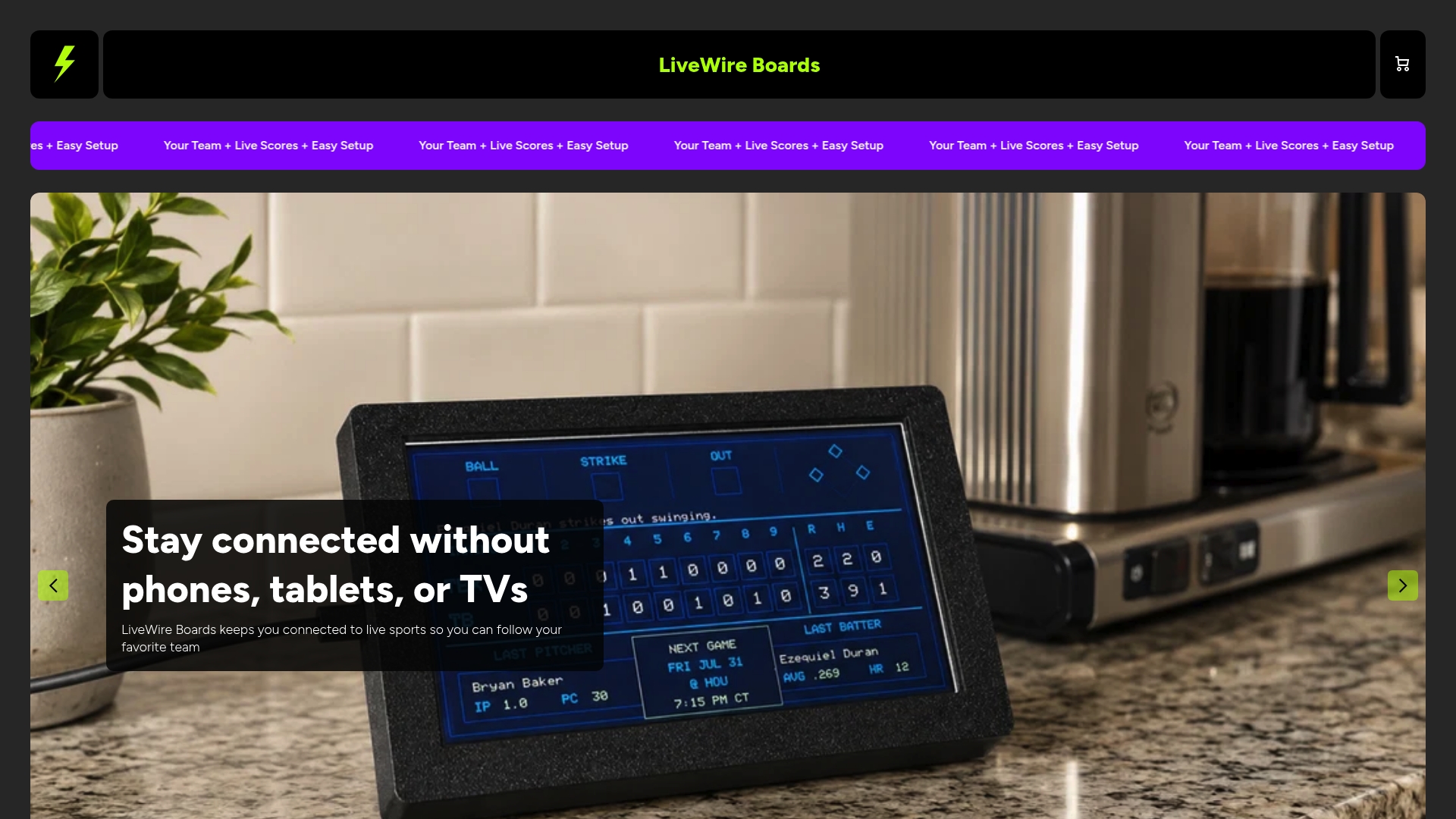
For families managing screen time, or households with kids who have ADHD and need fewer digital interruptions, it offers a way to stay in the game without adding another screen to the day. Visit the product page for The Original LiveWire Board to check availability and specs.
FAQ
What is a screen-free sports scoreboard?
It’s a Wi-Fi connected display that shows live score updates for teams you choose, without using a phone, tablet, or app notifications. The board pulls data over your home network and refreshes the score automatically, so there’s nothing to open or check.
Does a screen-free scoreboard replace phone sports apps?
It replaces the need to check a phone for scores, but it doesn’t offer stats, standings, or play-by-play detail the way a full app does. For families trying to watch sports distraction-free, that’s the intended tradeoff: less detail, far fewer interruptions.
Can a screen-free scoreboard help kids with ADHD?
A narrative review of screen time and ADHD found that reducing unstructured screen exposure can support existing ADHD management approaches. A dedicated scoreboard keeps score-checking separate from phone use, which limits the kind of open-ended screen time the review flagged as a concern.
Where should I place a screen-free scoreboard at home?
Pediatric guidance recommends keeping screens out of bedrooms and away from the hour before bed, so a kitchen counter or family room shelf tends to work best. That placement also means more people in the household can glance at it during meals or downtime.
Is The Original LiveWire Board hard to set up?
No. Setup involves connecting the board to home Wi-Fi and selecting favorite teams, with live updates appearing shortly after. Full specs and purchase details are available on the product page.


