
- en, team score display
- Cameron
Under a Minute to a Team Score Display, No Downloads or Accounts

The fastest way to get a live team score display running is a browser-based scoreboard tool. No downloads, no accounts, and most are ready to use in under a minute. For a permanent, screen-free setup at home or in a classroom, a Wi‑Fi hardware board like The Original LiveWire Board skips the browser entirely and just runs. Start with a free browser scoreboard for tonight’s game, then decide if a dedicated board makes more sense long term.
TL;DR:
- Browser-based scoreboards are quick to set up and ideal for streaming or tournaments, but require someone to actively control and monitor the display.
- Hardware boards like The Original LiveWire Board are better for permanent room displays, offer self-updating scores, and reduce distractions especially in family or classroom settings.
- Adjusting display features such as color, size, and contrast enhances accessibility for viewers with visual or sensory impairments without needing extra equipment.
- Wi‑Fi connectivity ensures proper operation; wired connections or dedicated hotspots are recommended for venues to prevent mid-game disconnections.
- Locking admin control to a single device minimizes scoring disputes during disputes or corrections, with hardware boards eliminating manual input errors altogether.
Table of Contents
- What a Team Score Display Actually Does
- How to Set Up a Live Scoreboard in Minutes
- Using a Scoreboard as a Stream Overlay
- Choosing the Right Display for the Room
- Setting Up Sport-Specific Timers and Scoring Rules
- Privacy, Offline Behavior, and What Happens When Wi‑Fi Drops
- Publisher Spotlight: The Original LiveWire Board
- Making a Live Scoreboard Accessible to Every Viewer
- Handling Scoring Errors and Disputes Fairly
- Where to Get the Original LiveWire Board
- Browser Scoreboard or Hardware Board: Which One Actually Fits
What a Team Score Display Actually Does
A modern team score display isn’t just a number on a screen. It’s a small control system, and the features that matter depend entirely on where you’re using it.
- Live updates with a shareable link: one person controls the score from an admin page while viewers watch a separate public URL.
- Timers and periods: quarters, halves, innings, or custom periods with countdown clocks and shot-clock resets for basketball.
- Broadcast readiness: layouts built for browser-source overlays, with dark backgrounds and oversized numerals that hold up on stream.
- Device flexibility: the same scoreboard page can run fullscreen on a TV, a projector, a tablet at the scorer’s table, or inside OBS.
- No-login setup: most browser tools need zero signup, while hardware options like a LiveWire board need Wi‑Fi but nothing else.
Match the feature set to the job. A weekend rec league scorer needs a timer and foul counter. A streamer needs an overlay that looks clean on camera. A parent who just wants scores on the wall without another screen in the house needs neither, and that’s where hardware earns its place.
How to Set Up a Live Scoreboard in Minutes
Getting a working team score display live is mostly a matter of picking the right starting point and not overthinking the settings.
- Choose your path: pick a browser-based scoreboard tool for one-off games and streaming, or a Wi‑Fi hardware board for something permanent.
- Select a sport preset: basketball needs 2 and 3-point increments and a shot clock; soccer and hockey usually run on single-point scoring with a running clock.
- Enter team names and set the period count: most tools let you name both teams, set quarters or halves, and define timer length in seconds.
- Open the live viewer URL on your target display: put it fullscreen on a TV, tablet, or projector screen.
- For streaming, copy that same live URL and add it as a browser source in OBS or Streamlabs, then resize it to fit your layout.
Pro Tip: If a browser scoreboard freezes or shows stale numbers, refresh the viewer page rather than the admin page. The admin controls hold the live state, and reloading the wrong tab can reset your score to zero.
If fullscreen mode doesn’t trigger, check that pop-up blockers aren’t interfering, and confirm your device isn’t on a guest Wi‑Fi network that blocks persistent connections. A quick network test before tip-off saves a scramble at halftime.
Using a Scoreboard as a Stream Overlay
Turning a live scoreboard into a clean stream overlay comes down to where you paste the link and how you style the display before you go live.
- Add it as a browser source: paste the live scoreboard URL directly into OBS or Streamlabs as a browser source, then set the width and height to match your overlay space.
- Design for the camera, not the room: dark backgrounds and large numerals read better on stream, and some tools support custom color schemes built for chroma keying so the scoreboard blends into a broadcast layout instead of sitting in a box.
- Split out the shot clock: for basketball broadcasts, a separate shot-clock URL lets you place a high-visibility countdown in its own overlay slot instead of cramming it next to the score.
- Watch your latency: browser-source overlays refresh on a short delay, which is fine for casual streams but worth testing before a paid broadcast.
For gym walls, cafeteria monitors, or scorer’s tables where nobody’s streaming anything, a dedicated hardware board is usually the better call. Overlays are built for cameras. A screen-free board is built for a room full of people just trying to check the score.
Choosing the Right Display for the Room
The right hardware for your scoreboard depends less on the sport and more on how far the audience sits from the screen.
- Gyms and large venues: a laptop connected to a projector gives you the biggest, most visible display, and it scales with browser zoom if you need bigger digits for distance.
- Small venues and living rooms: casting a fullscreen browser tab to a Smart TV or using Chromecast covers most casual setups without extra hardware.
- Scorer’s tables: a tablet or a dedicated Wi‑Fi display keeps the controls close at hand without competing with the audience view.
- Readability math: as a rough rule, plan on roughly one inch of digit height for every 10 feet of viewing distance, and zoom the browser page up if numbers look small from the back row.
- Aspect ratio checks: test your display in fullscreen before the event starts, since some browser scoreboards stretch oddly on ultra-wide projector screens.
A five-minute test run on the actual display, not just a laptop screen, catches sizing problems before they become a live audience’s problem.
Setting Up Sport-Specific Timers and Scoring Rules
Every sport scores differently, and the closer your setup matches real play, the less you’ll have to think about during the game.
- Increment rules: basketball needs 1, 2, and 3-point buttons, while soccer, hockey, and most other sports run on a single point per score.
- Periods and clocks: configure quarters or halves, add overtime periods in advance, and set shot-clock resets so they match your league’s actual rules.
- Timeout tracking: many scoreboard tools include a timeout counter per team, which matters more in basketball and football than in continuous-play sports.
- Saving your setup: some tools encode your settings directly into the page URL, so bookmarking that link reloads your exact layout, team names, and rules next time without re-entering anything.
Save that settings URL after your first setup. Reusing it for next week’s game is faster than rebuilding the scoreboard from scratch every time.
Privacy, Offline Behavior, and What Happens When Wi‑Fi Drops
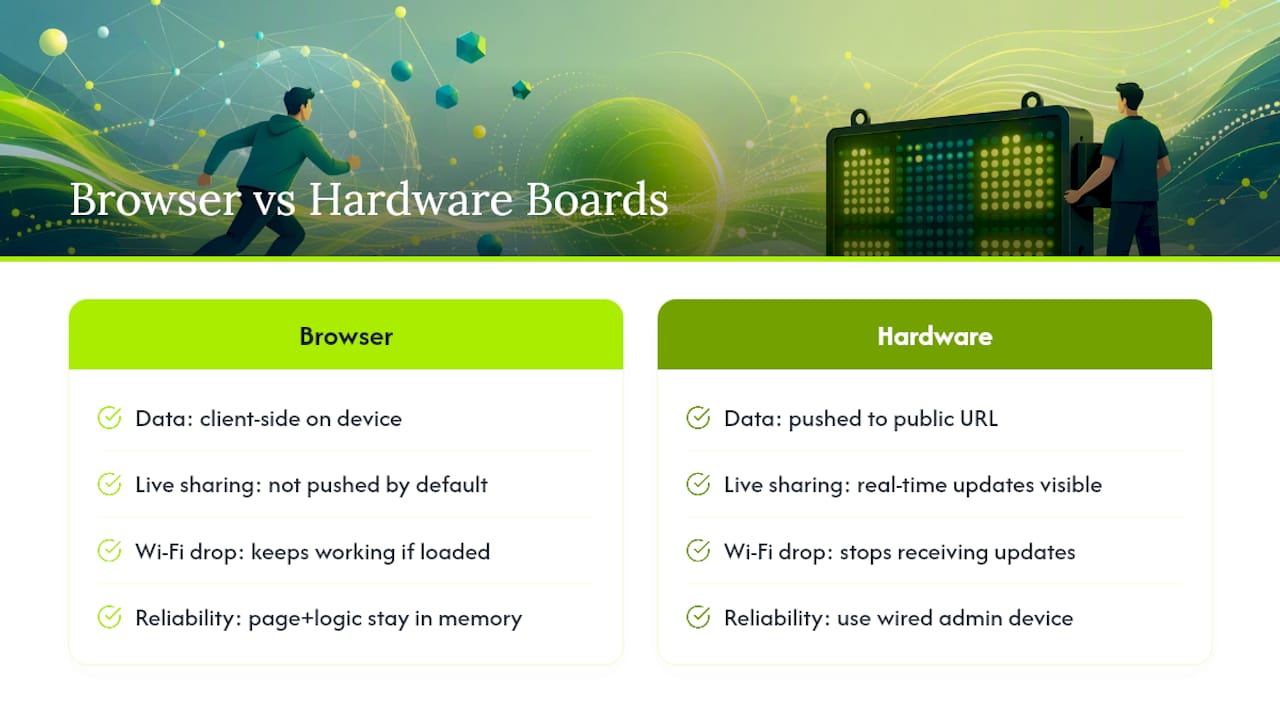
Browser scoreboards that run client-side keep your data on the device and don’t upload anything, which matters if you’d rather not broadcast game data to a server. Hosted live-link tools work differently. They’re built to push your score to a public URL, so anyone with the link sees updates in real time.
If Wi‑Fi drops mid-game, a browser tool that’s already loaded usually keeps working since the page and its logic are already in memory. Hardware boards need an active connection to receive updates, so for gyms or large venues, running the admin device on a wired connection and keeping the display on its own dedicated hotspot cuts down on mid-game disconnects.
Publisher Spotlight: The Original LiveWire Board
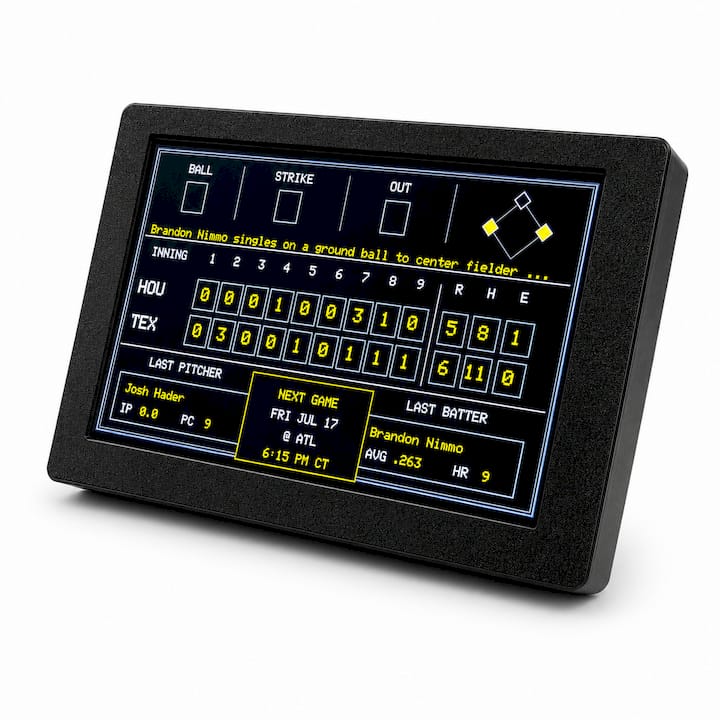
Livewireboards built The Original LiveWire Board for a specific problem: getting live scores into a room without adding another screen. The board connects to Wi‑Fi, and once you pick your favorite teams in baseball, football, basketball, or hockey, it pulls live score updates automatically. No app, no phone check-ins, no tablet propped on the counter.
That screen-free design is the whole point. Families using LiveWire Boards to cut down on phone and tablet time have reported that following a game feels less distracting, particularly for kids with ADHD who struggle with constant notifications pulling their attention elsewhere. The board just sits on a shelf or wall and updates itself.
Setup takes minutes: connect to Wi‑Fi, pick your teams, done. It’s built for a den, a kitchen, or a classroom corner, not for streaming or venue broadcast, which is exactly where browser scoreboards take over.
Making a Live Scoreboard Accessible to Every Viewer
A scoreboard that only works for people with sharp eyesight and fast reflexes is leaving part of the room out. A few adjustments make a real difference for viewers with visual, cognitive, or motor differences.
- High-contrast color choices: white or yellow numerals on a black background read far better for viewers with low vision than pastel color schemes, and most browser scoreboards let you adjust colors directly.
- Font size and browser zoom: increasing browser zoom on a live scoreboard page scales the entire display, which helps viewers seated farther back or with visual impairments without needing special software.
- Reduced motion: some scoreboard tools include flashing effects on score changes; turning those off benefits viewers with photosensitivity or attention-related sensitivities.
- Screen-free alternatives: a hardware board like LiveWire removes flashing animations, autoplay video, and notification clutter entirely, which some households find easier to follow than a phone or tablet feed, especially for viewers with ADHD or sensory processing differences.
- Audio pairing: for venues with visually impaired attendees, pairing the visual scoreboard with a PA announcement of score changes covers the gap a screen alone can’t fill.
None of these require special equipment. Most are a settings change away, and the payoff is a scoreboard that actually works for the whole room, not just the front row.
Handling Scoring Errors and Disputes Fairly
Every scorekeeper eventually hits the wrong button. What separates a smooth recovery from a shouting match at midcourt is having a clear process before it happens, not scrambling for one in the moment.
Most browser scoreboards include an undo function or a manual adjustment control on the admin page, so correcting a mistaken point takes seconds if you catch it right away. The bigger risk is catching it late. If a dispute comes up after several plays have passed, pause the clock before making any adjustment. Announcing the correction out loud, whether it’s a referee call or a scorer’s fix, keeps both teams and the audience on the same page instead of guessing why the number jumped.
For league or tournament settings, it helps to designate one person as the only one with access to the admin link. Shared control between multiple phones or laptops is where most scoring disputes actually start, since two people editing the same live scoreboard can overwrite each other’s changes without either one noticing. Lock admin access down to a single device per game.
Hardware boards sidestep most of this because there’s no manual entry to fumble. The board just displays whatever the official league feed reports, so disputes shift to the same place they’d normally happen: on the court or field, not on the screen.
Where to Get the Original LiveWire Board
If a browser scoreboard covers tonight’s stream and you’re looking for something that just runs in the background at home, The Original LiveWire Board is built for exactly that. It’s a Wi‑Fi device that pushes live scores for your selected teams in baseball, football, basketball, or hockey, no phone or app required.
Before ordering, confirm your home network has standard Wi‑Fi coverage where you plan to place the board, and check which sports and teams are currently supported on the product page. Livewireboards also offers optional color case upgrades if you want the board to match a room instead of sitting there as another beige gadget.
Keep the two tools separate in your head: a browser scoreboard is the right call for streaming a game live or running a scorer’s table at a tournament. A LiveWire board is the right call for the den, the kitchen, or a classroom that just wants scores on display without turning into another screen kids stare at. Order the board directly through Livewireboards and it ships ready to connect out of the box.
Browser Scoreboard or Hardware Board: Which One Actually Fits
Cost and setup time point in opposite directions here. A browser scoreboard costs nothing and takes under a minute to configure, but someone has to run it, watch it, and keep the tab open. A hardware board costs more upfront and needs a one-time Wi‑Fi setup, then it just works without anyone touching it again.
Streamers and tournament organizers should stick with browser tools. They’re built for overlays, admin control, and quick changes mid-event. Teachers running a classroom points system are usually better off with a browser widget built for quick resets, since the whole point is speed between activities. Parents who just want game scores visible in the living room without handing a kid a tablet are the clearest case for hardware. Families using screen-free boards have reported better focus while following games, which tracks with what a lot of parents already suspect about swapping a glowing screen for a simple, always-on display.
If you’re running a trivia night or company game show alongside your scoreboard, a fantasy team name generator is worth a look for naming teams before the scoring even starts.
— Cameron


